3. Download Audio and Make a Spectrogram
This walkthrough downloads a short ONC audio range and generates PNG and MAT spectrograms locally. This common workflow is presented first because many users want the source audio and control over their spectrogram settings. ONC's server-generated spectrogram products are introduced on the ONC Spectrogram Products and Server Options page.
Before continuing, complete Install and Configure and use Find a Hydrophone to confirm that your device and dates are valid.
What this example creates
data/
└── ICLISTENHF6324/
    └── audio_range_2024-04-01_to_2024-04-01/
        ├── audio/                 # ONC FLAC or WAV source files
        └── custom_spectrograms/   # Locally generated PNG and MAT files
Audio files generally cover five-minute source windows, so a ten-minute query may download more than one file.
Run the complete workflow
from datetime import datetime, timezone
from pathlib import Path

from onc_hydrophone_data.audio import SpectrogramGenerator
from onc_hydrophone_data.data import HydrophoneDownloader
from onc_hydrophone_data.onc.common import load_config

# 1. Load the token and output directory from .env.
onc_token, data_dir = load_config()
downloader = HydrophoneDownloader(onc_token, data_dir)

# 2. Use a device/date combination confirmed on the deployment page.
device = "ICLISTENHF6324"
start = datetime(2024, 4, 1, 12, 0, tzinfo=timezone.utc)
end = datetime(2024, 4, 1, 12, 10, tzinfo=timezone.utc)

# 3. Download every FLAC/WAV file overlapping this short range.
downloader.download_audio_for_range(
    device_code=device,
    start_dt=start,
    end_dt=end,
)

# 4. Generate local spectrograms from the downloaded audio directory.
audio_dir = Path(downloader.audio_path)
spectrogram_dir = audio_dir.parent / "custom_spectrograms"

generator = SpectrogramGenerator(
    win_dur=0.5,
    overlap=0.75,
    freq_lims=(20, 10_000),
    crop_freq_lims=True,
    log_freq=False,
)
results = generator.process_directory(
    audio_dir,
    spectrogram_dir,
    save_plot=True,
    save_mat=True,
)

for result in results:
    if "error" in result:
        print("Failed:", result["audio_file"], result["error"])
    else:
        print("PNG:", result["png_file"])
        print("MAT:", result["mat_file"])
The downloader skips non-empty audio files already present, so rerunning the same range resumes instead of downloading those files again.
What the data show
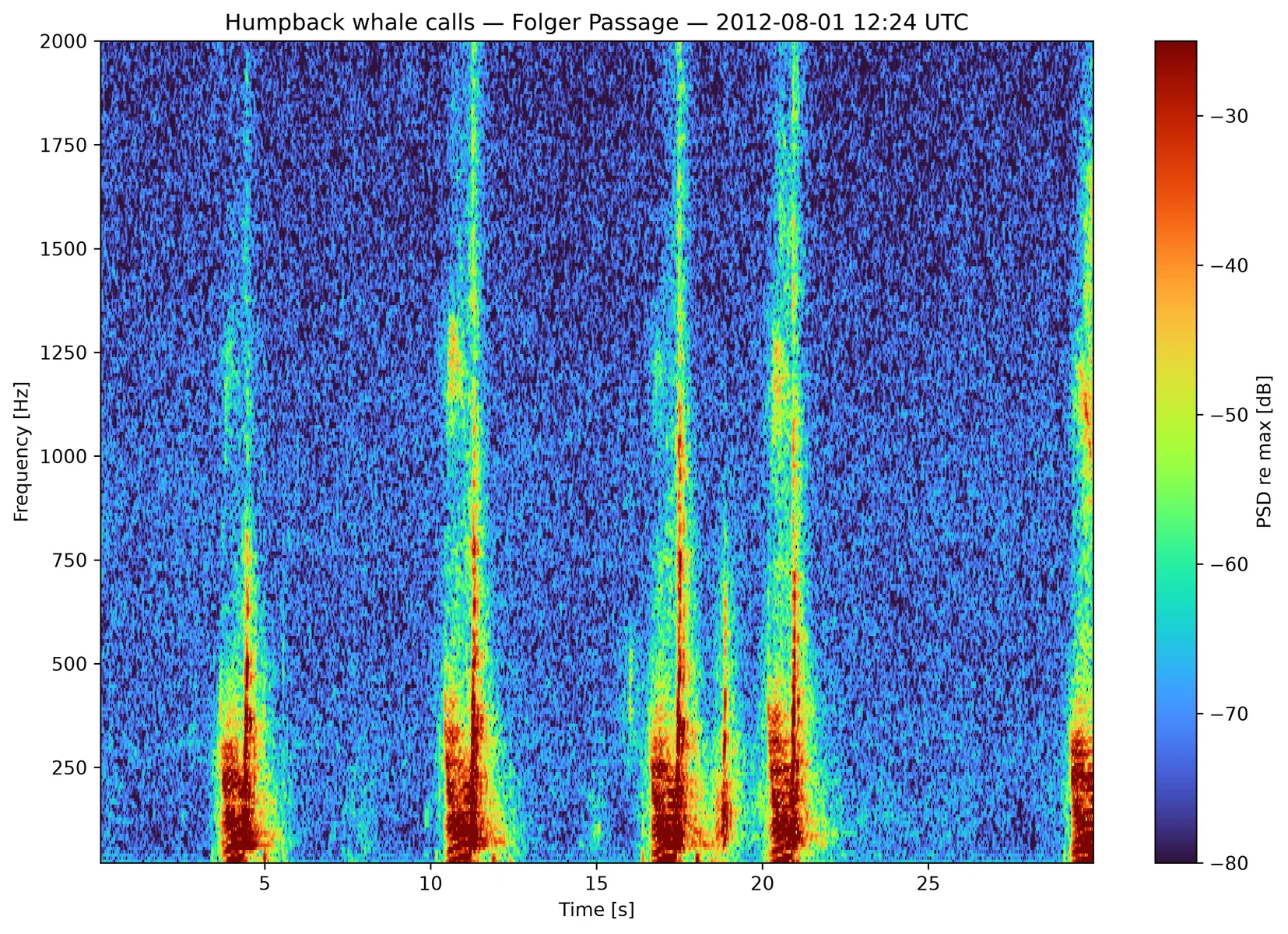
The recording contains repeated humpback calls whose acoustic energy changes over time and frequency. The spectrogram values are power in dB relative to the strongest value in the file, not calibrated sound-pressure level.
Real ONC audio
This figure was generated locally from a public ONC recording made by
hydrophone ICLISTENHF1205 at Folger Passage on 2012-08-01 at 12:24 UTC.
See the ONC source record.
The colour scale is relative to the recording maximum, not calibrated
sound-pressure level.
Check the result before scaling up
Open one PNG and confirm:
- the time range is what you intended;
- the frequency range includes the signals you care about;
- the audio duration and number of files are reasonable.
Then continue with Download Audio for longer ranges and sampling, or Generate Local Spectrograms to tune FFT and output settings.