Migrating to Vertex AI for a greener ChatTNG
ChatTNG is an interactive conversational AI project set in the Star Trek universe. Beyond just building an engaging experience, I wanted to ensure the underlying infrastructure aligned with sustainable principles that reflect both my own personal values and the utopian ideals of the Star Trek universe.
Recently, I undertook a straightforward architectural migration from the standard Google Gemini API (AI Studio) to Google Cloud Vertex AI. While both platforms offer access to Google’s powerful Gemini models, this move was driven by a specific, critical goal: Carbon-Free Energy (CFE).
The Challenge: Gen AI and Energy Consumption
Large Language Models (LLMs) are computationally intensive. Every query sent to a Gen AI model spins up processors in a data centre somewhere in the world. When using global API endpoints, you often have little control over where that compute happens. The network might route your request to a data centre powered by coal or natural gas, depending on traffic and availability.
I wanted the project’s infrastructure to reflect values of sustainability, ensuring the AI processing is as clean as possible.
The Solution: Region Selection with Vertex AI
Google Cloud is a leader in 24/7 Carbon-Free Energy, but the availability of CFE varies significantly by region. By migrating to the Vertex AI API, I gained the ability to strictly enforce which data centre processes my requests.
I specifically configured the application to use the northamerica-northeast1 (Montréal) region. Historically, this region operates on nearly 100% carbon-free energy, primarily due to Quebec’s abundant hydroelectric power.
For context, compare this to other popular cloud regions:
- Stockholm (europe-north2): A benchmark for sustainability with 100% CFE.
- Iowa (us-central1): Often high, around 90%, thanks to wind power.
- Northern Virginia (us-east4): Historic averages can be significantly lower (often <50%) due to a mixed grid relying more heavily on fossil fuels.
Choosing the right region allows for drastically reducing the carbon footprint of every inference.
It’s also worth noting that Vertex AI hosts models from other providers, like Anthropic. While you can also select regions for these models, the available locations are often more limited than for Google’s native Gemini models. This can constrain your ability to optimize for carbon-free energy, so it’s important to cross-reference model availability with regional CFE data.
Addressing Water Consumption
Another common concern with Gen AI is the significant water usage required for cooling data centres. It’s a valid worry, especially in drought-prone areas.
However, Google’s 2025 Environmental Report reinforces why this region is a superior choice. Data shows the Montreal data centre is one of the lowest consumers of water in Google’s entire fleet, consuming just 0.1 million gallons in 2024. This is vastly lower than other regions that can consume hundreds of millions of gallons.
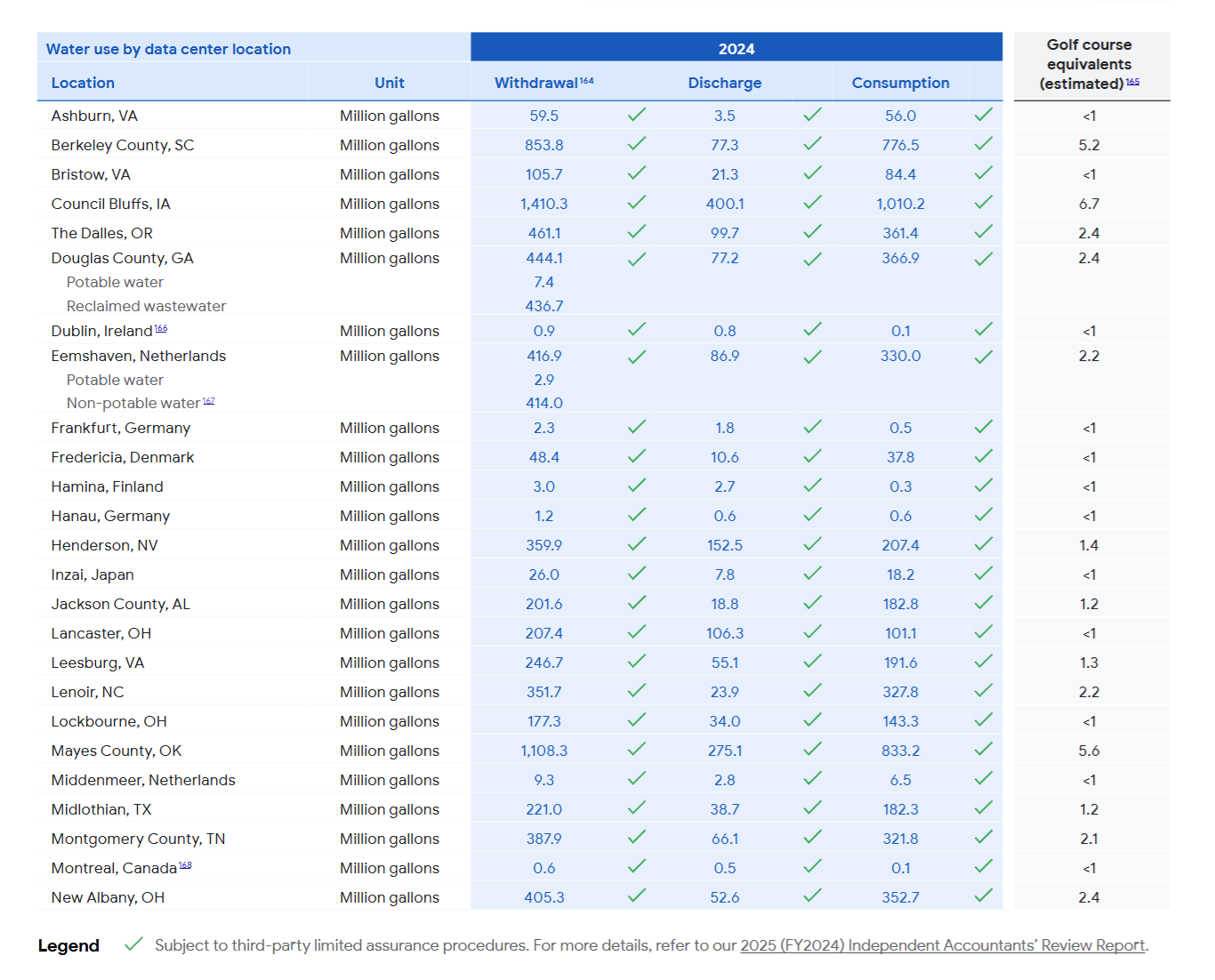
The secret? The Montreal facility is an air-cooled data centre (similar to others in the region). It leverages the region’s naturally cool climate to regulate temperature, eliminating the need for thirsty evaporative cooling towers.
By selecting this region, I’m ensuring that ChatTNG’s operations aren’t competing for scarce water resources while also running on clean energy.
Technical Implementation Guide
This migration entailed more than a simple configuration update; it required updating the authentication flow, container orchestration, and application logic. It was quite simple to implement; here is exactly how I did it.
Step 1: Authentication (The Move to ADC)
The Gemini API (via AI Studio) uses simple API keys. Vertex AI, being part of the Google Cloud Platform (GCP) enterprise suite, requires Application Default Credentials (ADC).
Local Development Setup: First, I needed to authenticate my local machine with GCP to generate the credentials file.
# Install the Google Cloud SDK
curl https://sdk.cloud.google.com | bash
exec -l $SHELL

# Initialize access to your project
gcloud init

# Generate the application-default credentials file
gcloud auth application-default login
# This saves credentials to ~/.config/gcloud/application_default_credentials.json
Step 2: Docker Configuration
Since the app runs in Docker, the container needs access to those credentials managed on the host machine. I achieved this by mounting the credentials file directly into the container.
docker-compose.dev.yml (and Prod): I updated the service definition to mount the credentials and set the GOOGLE_APPLICATION_CREDENTIALS environment variable to point to them.
services:
  backend:
    # ... other config ...
    environment:
      # Tell Google libraries where to look for the key
      - GOOGLE_APPLICATION_CREDENTIALS=/root/.config/gcloud/application_default_credentials.json
      # ... other env vars ...
    volumes:
      # Mount the host system's credentials into the container (Read-Only)
      - ~/.config/gcloud/application_default_credentials.json:/root/.config/gcloud/application_default_credentials.json:ro
Step 3: Updating the Python Backend
I standardized on the new google-genai SDK, which elegantly handles both Vertex AI and AI Studio connections.
Config Updates (app_config.yaml): I added a section to specifically define the target project and the eco-friendly location.
gemini:
  vertex:
    project_id: "your-gcp-project-id"
    location: "northamerica-northeast1" # Montreal (High Carbon-Free Energy %)
Code Implementation (llm_interface.py): I refactored the initialization logic to switch between the two modes based on configuration.
from google import genai as google_genai_client

# ... inside class initialization ...

# Check if Vertex AI is configured in app_config.yaml
self.use_vertex = bool(self.vertex_config.get("project_id")) and bool(self.vertex_config.get("location"))

if self.use_vertex:
    logger.info("Initializing new GenAI Client for Vertex AI (Region: northamerica-northeast1)")
    # Initialize client with Vertex AI parameters
    self._new_genai_client = google_genai_client.Client(
        vertexai=True,
        project=self.vertex_config["project_id"],
        location=self.vertex_config["location"]
    )
else:
    # Fallback to standard API Key (AI Studio)
    logger.info("Initializing new GenAI Client for AI Studio")
    self._new_genai_client = google_genai_client.Client(api_key=self._gemini_api_key)
By unifying the interface under the google-genai SDK, I reduced dependency on the older, strictly API-key-based libraries and unlocked the full power of Google Cloud’s regional infrastructure.
Results
- 100% Control: I now know exactly where the inference compute is happening.
- Zero Emissions Target: by pinning workloads to Montreal, every conversation with ChatTNG is powered by water.
- Enterprise Grade Security: Switching to IAM/ADC improved the security posture significantly compared to loose API keys.
Looking Ahead: Dynamic Green Routing
While I currently route all traffic to Montreal to maximize sustainability, I am mindful of the potential latency impact for users in other parts of the world.
If latency becomes a hurdle, I plan to implement Dynamic Green Routing. This system will automatically direct users to the nearest high-CFE data centre. For example:
- European users would route to Finland (europe-north1) or Stockholm (europe-north2) (both >97% CFE).
- South American users would route to São Paulo (southamerica-east1) (~87% CFE).
This approach would balance the prime directive of sustainability with the need for a snappy, responsive user experience.